PRICING / FREE & PRO

Your business. Your pace. Your plan.

Start with 7 days of Pro. After that, Free stays free. You decide whether you need more. No credit card required.

Billing cycle

€90 / year instead of €120 · Save €30

FREE / YOUR START

Just get started.

€0

Free forever

  • Projects, tasks, clients & budgets
  • Time tracking, notes & travel expenses
  • 1 funnel · 20 leads / month
  • 3 booking links & public profile
  • 100 AI credits · 5 receipt scans / month
  • Mac app, Google Calendar & MCP
  • Basic reports & CSV export

1 workspace · up to 3 projects

Start for free

7 days of Pro included · No credit card

KLAUSI PRO / RECOMMENDED

Everything for your working day.

€10

Per month · Launch price · incl. statutory VAT

  • Everything in Free
  • Invoices, e-invoices & CRM
  • Finance dashboard & advanced reports
  • Unlimited projects · up to 3 workspaces
  • 2,000 AI credits · 200 receipt scans / month
  • Your own brand, sharing & project files
  • Brain, smart scheduling & more

Cancel monthly · €90 annually

Try Pro free for 7 days

Then automatically Free unless you choose Pro.

All prices include statutory VAT. The trial has its own AI allowances. See the comparison for details.

THE COMPARISON / WHAT YOU GET

Plenty in Free. More possible with Pro.

Compare features and allowances. Max is still being planned and will follow separately.

Free and Pro feature comparison
FEATUREFREEPRO
01 / PLAN, WORK & ORGANISE
Workspaces

Workspace switching keeps data and operations separated, for example personal and business.

1 workspaceUp to 3 workspaces (e.g. personal & business)
Project capacity

Free is designed for limited project volume; Pro is built for unlimited project operations.

LimitedUnlimited
Projects & Clients

Clients, projects, services, and subcategories stay connected. Time and cost budgets plus budget alerts surface deviations early.

IncludedIncluded
Time Tracking

Session timer with start/stop/pause, project/service assignment with subcategories, CSV import for Clockodo, Toggl, mite, Harvest, and Kimai plus manual mapping, Chrome extension, and weekly drag-to-create calendar.

IncludedIncluded
Tasks

Smart bucketing (Inbox to Someday), inline editing with priority/estimate/energy level, multiple task types, drag and drop, subtasks, attachments, link preview, and full-text search with filters.

IncludedIncluded
Notes, voice & knowledge work

Rich-text notes with folders, daily notes, backlinks, task blocks, version history, trash, sharing, and export. Voice input can be transcribed, refined, and turned into tasks.

IncludedIncluded
Documents hub

A central documents hub: one view of all uploaded files with previews and categories.

IncludedIncluded
Project & note sharing

Share project activity and notes via kla.to – with passwords, expiry dates, and PDF export.

IncludedIncluded
Google Calendar

Google Calendar provides Free/Busy checks for bookings, calendar context for realistic day plans, and synchronization for supported bookings and time entries.

IncludedIncluded
Notifications & reminders

Reminders surface forgotten timers, budget thresholds, CRM follow-ups, invoices, and bookings before they become urgent.

IncludedIncluded
Project Budgets

Project budgets and cost control keep effort and profitability visible.

IncludedIncluded
Site-wide search

Site-wide search (⌘K) finds projects, notes, tasks, clients, and invoices from anywhere — with quick actions and recently opened results.

IncludedIncluded
Desktop app for Mac

The signed Mac app is included in every plan, Free as well: voice bar above the Dock, meeting recording without screen capture, and access from the menu bar. It currently runs on Apple silicon Macs; there is no Windows version yet. On Windows you work in the browser or with the installed web app.

IncludedIncluded
Project file storage

Per-project file storage (briefings, contracts, presentations) right inside the project hub.

Not includedIncluded
Brain (relationship graph)

Brain shows every connection between clients, projects, notes, and tasks as an interactive relationship graph — one click drills straight into each context.

Not includedIncluded
02 / CLIENTS, BUSINESS & AI
AI automation

AI credits power agents, automations, and AI actions: Free 100, Trial 500, Pro 2000 credits (1 credit = €0.001).

100 credits2000 credits
Public Creator Page

Creator Site works as a personal-brand hub with profile, portfolio, link tree, social and media embeds, bookings, funnels, design, SEO and Open Graph cards on kla.to. Free: 1 page with up to 10 links and the basic templates. Pro: unlimited pages and links, premium templates and creator analytics.

1 page, 10 linksUnlimited + premium templates
Scheduling & Booking Links

Public booking links with slots, Meet/phone/in-person/custom locations, timezone support, booking policies, and iCal export. Free: 3 active links, manual availabilities, drag & drop and Google conflict display. Pro: unlimited active links, availability templates, smart suggestions plus multiple durations and booking limits.

3 active linksUnlimited + templates
Funnels

Lead funnels combine landing pages, booking modules, analytics, versioning, rollback, UTM analysis, embeds, and client review workflows. Free includes one permanent funnel with 20 fully usable leads per calendar month; additional leads remain stored and unlock with Pro.

1 funnel · 20 leads/month10 funnels · 500 leads/month
Receipt scans (AI)

Receipts are read by AI — amount, date, merchant and category are filled in automatically. Monthly allowance: Free 5, Trial 50, Pro 200 scans.

5 scans/month200 scans/month
Travel Expenses

Trip management with stops (flight/drive/train), geo-intelligent address autocomplete, receipt upload with categorization, mileage logic, advances, and PDF travel reports.

IncludedIncluded
Project dashboard

The project hub includes 10 tabs: overview, notes, tasks, links, hours, budget, receipts, files, whiteboard, and settings (files tab is Pro).

IncludedIncluded
AI Command Center & day planning

The AI Command Center answers questions using tasks, projects, CRM, and finance context. It prepares day plans and drafts for tasks, projects, time entries, and business documents before you confirm them.

IncludedIncluded
MCP for external AI tools

The MCP connection gives external AI tools explicitly approved access to selected Klausi data. Reading and targeted creation or updates are supported; deletion, invoice delivery, and external shares remain unavailable.

IncludedIncluded
Notion access links

Notion Gate protects shared Notion pages with a password and branded landing pages for external document access.

IncludedIncluded
Live translation

Live translation transcribes and translates spoken language in real time — with shareable viewer and beamer views for talks and events.

Extra credits as neededExtra credits as needed
Audio transcriptions

Voice dictation and recordings are transcribed. Monthly minute allowance: Free 10, Trial 30, Pro 300 minutes.

10 min/month300 min/month
Own branding

Own branding keeps customer-facing surfaces consistently on-brand.

Not includedIncluded
CRM

Pipeline and lead inbox connect deals, contacts, and organizations with activities, reminders, tags, attachments, goals, forecasts, loss reasons, focus views, and analytics.

Not includedIncluded
Invoicing

Quotes, order confirmations, partial and final invoices, corrections, cancellations, and credit notes stay in one document flow. Recurring invoices, reminders, PDF, and e-invoicing (XRechnung & ZUGFeRD, EN16931) are included.

Not includedIncluded
E-invoicing & sending

Generate XRechnung & ZUGFeRD (EN16931 format) straight from the invoice and send it to clients by email in one click — including PDF and XML.

Not includedIncluded
Finance dashboard

Monthly overview, transactions, recurring costs, balances, debt, taxes, KSK, VAT mode, forecasting, car costs, health insurance, and receipts can be organized as modular workflows.

Not includedIncluded
Share documents

DocShare provides shareable document links with password protection, access tracking, and controlled sharing.

Not includedIncluded
03 / REPORT & EXPORT
Basic Reports

Basic reports cover core analytics for time, projects, and costs.

IncludedIncluded
CSV Export

CSV export provides raw data for external processing.

LimitedFull
Advanced Reports

Advanced reports provide deeper analytics and additional filters.

Not includedIncluded
PDF Export

PDF export delivers client-ready reports and documentation.

Not includedIncluded
04 / SECURITY, DATA & SUPPORT
GDPR-compliant

German-first positioning with native German UX, GDPR focus, and KSK integration is a key differentiator.

IncludedIncluded
EU Hosting

EU hosting ensures data residency within the EU.

IncludedIncluded
Data portability

Account export, CSV import, and controlled deletion flows make it possible to bring data into Klausi, process it externally, and take it out again.

IncludedIncluded
Support

Differentiators: German-first UX, AI-native planning, all-in-one instead of tool fragmentation, and creator hub for personal branding. Pricing logic: Free covers core features, Pro adds advanced capability (€10/month). Max will follow as a separate team and scale plan.

StandardPriority
Permissions & audit trail

Role-based access (owner/admin/member), per-person permissions, and an audit trail that shows who changed what and when — including login and security events. Plus workspace switching for multiple companies.

Not includedIncluded
Period locking (traceability)

Locked periods can no longer be changed silently, which keeps closed periods traceable. Existing locks always stay in force, including on Free; creating and releasing locks is part of Pro.

Not includedIncluded

✓ Included — Not included in this plan

Trial: 500 AI credits · 50 receipt scans · 30 transcription minutes. Monthly allowances are counted separately and reset.

Creator Site: see the FAQ for details on the Free plan.

LIVE TRANSLATION / MINUTES ON DEMAND

Buy minutes. Without a new subscription.

3 free minutes per month are included in every plan. For longer events, buy extra minutes once.

Purchased minutes never expire. Billed by the minute.

Explore live translation
60 minutes
€9
120 minutes
€15
300 minutes
€30

300 minutes: promotional price instead of €40 · incl. statutory VAT. Buy minutes directly in Live Translation.

IN EVERY PLAN

Your workspace. Everywhere with you.

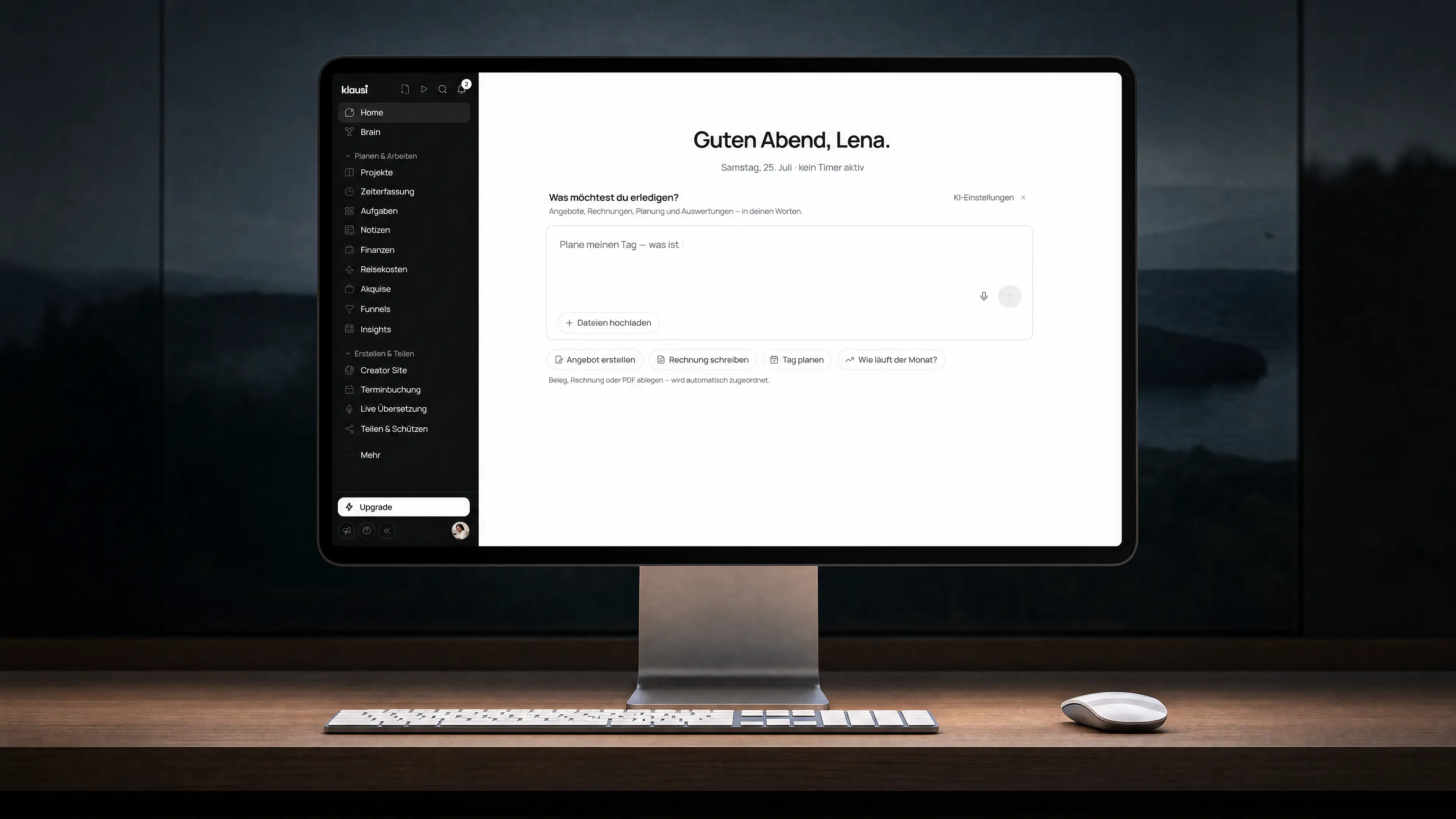
In your browser, as a Mac app, web app or Chrome extension. Free and Pro are available everywhere.

Klausi desktop workspace with tasks and projects

YOUR ACCOUNT. YOUR DATA.

Stay in control.

  1. 01

    Protect your account.

    Enable two-factor authentication for your login.

  2. 02

    Take your data with you.

    Request an account export. You keep access to your data.

  3. 03

    Control AI yourself.

    You decide on AI consent. Start data deletion separately.

Frequently asked questions

All clear? Let’s get specific.

Trial, plans, cancellation and your data.

Visit the help centre
Can I upgrade anytime?

Yes, you can switch from Free to Pro at any time. Your data will be preserved.

Is there a minimum term?

No. You can cancel monthly. For annual payments, the subscription applies for 12 months.

What happens to my data if I cancel?

Cancelling only ends your Pro subscription at the end of the paid period. Your account and data are not deleted automatically; you can continue using Klausi on Free. Account deletion must be started separately in settings.

Can I try Klausi Pro?

Yes — every new account starts automatically with 7 days of Pro.

What payment methods are available?

Checkout runs through Stripe and supports card payments and PayPal. SEPA direct debit is not enabled at this time.

Are the prices inclusive of VAT?

Yes. All prices shown on this page are total prices and include the applicable VAT.

Are there discounts for annual subscriptions?

Yes. Pro costs €90 per year when billed annually. That is equivalent to €7.50 per month and saves 25% compared with twelve monthly payments of €10.

Which CSV imports does Klausi support?

Klausi recognises exports from Clockodo, Toggl Track, Clockify, mite, Harvest, and Kimai. Unknown CSV formats can also be mapped to the appropriate fields manually.

Where is my data stored?

The core infrastructure and primary data storage are configured for EU locations. Individual features may also use commissioned or user-connected third parties, including providers operating internationally. See the privacy policy for details.

Does Klausi work on mobile?

Yes. Klausi works without installation in the browser on desktop, tablet, and smartphone. You can optionally install it as a PWA, and mobile plus Chrome extension workflows are also available.

Is there a desktop app, and does it cost extra?

There is one for the Mac, and it is included in every plan — Free as well, at no extra cost. You get the voice bar above the Dock, meeting recording without screen capture, and access from the menu bar, all in your existing workspace. Download it at klausi.app/download; the app is signed and Apple-notarized and currently runs on Apple silicon Macs. There is no Windows version yet — on Windows you work in the browser or install the web app.

How many workspaces are included?

Free includes 1 workspace. Pro includes up to 3 workspaces, for example personal and business. Max is still planned.

Is Klausi tax-deductible?

When used for business, Klausi Pro can generally be treated as a business expense. Whether and to what extent this applies to you should be confirmed with your tax adviser. You receive a proper invoice.

What happens if I downgrade from Pro to Free?

Free applies once the paid period ends. Your data is preserved, while features and monthly allowances follow the Free plan. Content above the Free limits is not deleted automatically, but editing or adding to it may be restricted until you upgrade again.

What limits apply to AI, receipt OCR, and transcription?

Allowances are counted separately and reset monthly. AI agent: Free 100, trial 500, and Pro 2,000 credits. Receipt OCR: Free 5, trial 50, and Pro 200 scans. Audio transcription: Free 10, trial 30, and Pro 300 minutes.

What restrictions apply to the Creator Site on Free?

Free includes one Creator Site with up to 10 links and the basic templates. Pro adds unlimited pages and links, premium templates and creator analytics.

How can I export my data or delete my account?

You can request an account export and export data as CSV or PDF in several areas. Controlled account deletion is started separately in company settings. Cancelling a subscription alone deletes neither your account nor your data.

Can I refer Klausi to others?

Yes. Through the referral program, both the person inviting and the new user can receive additional Pro days. Your personal referral link is available inside Klausi.
Start for free. Do your thing.

Try Klausi with Pro for 7 days. After that, Free stays free. You decide whether to keep Pro.

Start for free

No credit card · No automatic paid subscription